Cloudflared#
Cloudflared is an optional DUMB service that runs the Cloudflare Tunnel connector inside the DUMB container. It lets public Cloudflare hostname traffic reach DUMB's built-in Traefik entrypoint without opening router ports directly to the internet.
The intended flow is:
flowchart LR
    A([Browser]) --> B[Cloudflare]
    B --> C[cloudflared in DUMB]
    C --> D[DUMB Traefik :18080]
    D --> E[TPA-managed route]
    D --> F[DUMB embedded UI route]
Cloudflared gets traffic to Traefik. Traefik still decides which local service receives the request.
Before you start#
You need:
- A Cloudflare account.
- A domain added to Cloudflare.
- The domain's authoritative nameservers pointed at Cloudflare.
- DUMB running with Traefik enabled.
- Traefik Proxy Admin enabled if you want to publish user-managed subdomains through TPA.
Cloudflare has a free plan that is enough for a normal first tunnel setup, but plan features and limits can change. Check Cloudflare's current pricing and Zero Trust plan pages before depending on it for anything critical.
Public access is real access
Cloudflared does not make an app private by itself. It only creates the tunnel. Keep TPA auth, service auth, Cloudflare Access, or the upstream app's own authentication enabled for anything exposed publicly.
Step 1: Add your domain to Cloudflare#
If your domain is already active in Cloudflare, skip to Step 2.
- Create or sign in to a Cloudflare account.
- Add your domain as a Cloudflare site/zone.
- Choose the free plan unless you know you need paid Cloudflare features.
- Cloudflare will scan existing DNS records. Keep any records you already need.
- At your registrar, change the domain's nameservers to the two Cloudflare nameservers shown during setup.
- Wait for Cloudflare to mark the domain active.
This nameserver change is what lets Cloudflare answer DNS for your domain and route public hostnames through Tunnel.
Step 2: Create a Cloudflare Tunnel#
In Cloudflare, go to Zero Trust -> Networks -> Connectors -> Cloudflare Tunnels, then create a new tunnel.
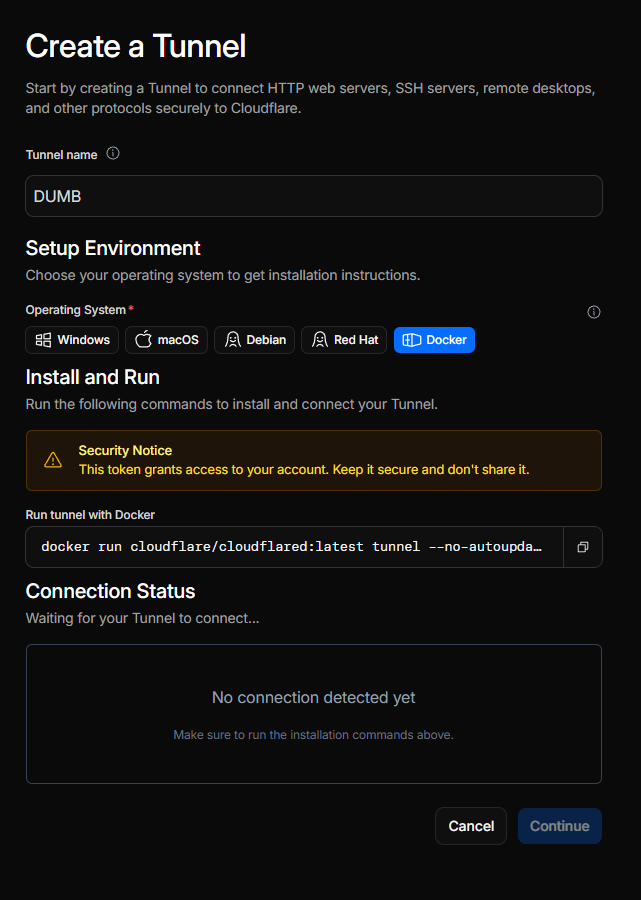
Give the tunnel a simple name such as DUMB. Choose a cloudflared tunnel. DUMB uses a remotely-managed, token-based tunnel, so you do not need to run the Cloudflare install command on the host.
When Cloudflare shows the connector install command, copy only the tunnel token from the command. It is the long token after --token.
Treat the tunnel token like a password
Anyone with the token can run a connector for that tunnel. Store it only in DUMB's Cloudflared service config and rotate it in Cloudflare if it is exposed.
Step 3: Enable Cloudflared in DUMB#
In dmbdb, open the Cloudflared service page.
- Enable the service.
- Paste the copied tunnel token into
tunnel_token. - Save the config.
- Start or restart Cloudflared.
DUMB automatically starts Traefik before Cloudflared. In the Cloudflared logs, a healthy tunnel usually shows messages like:
Registered tunnel connection
CONNECTIVITY PRE-CHECKS
SUMMARY: Environment is healthy
The UDP receive-buffer warning from quic-go is common in containers and does not usually block the tunnel.
On the first run, Cloudflare will show "Tunnel connected successfully." You can then click Continue.
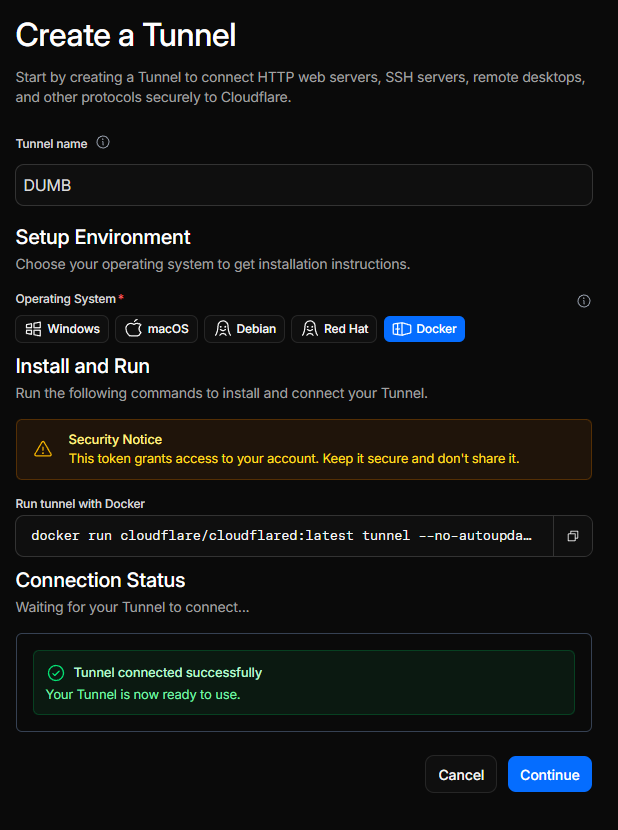
Step 4: Create the public hostname route#
Cloudflare has two tunnel views. The account-level Tunnels page may show a simplified route editor. For the full origin settings, open the tunnel action menu and choose Manage in Zero Trust.
In Zero Trust:
- Open the tunnel.
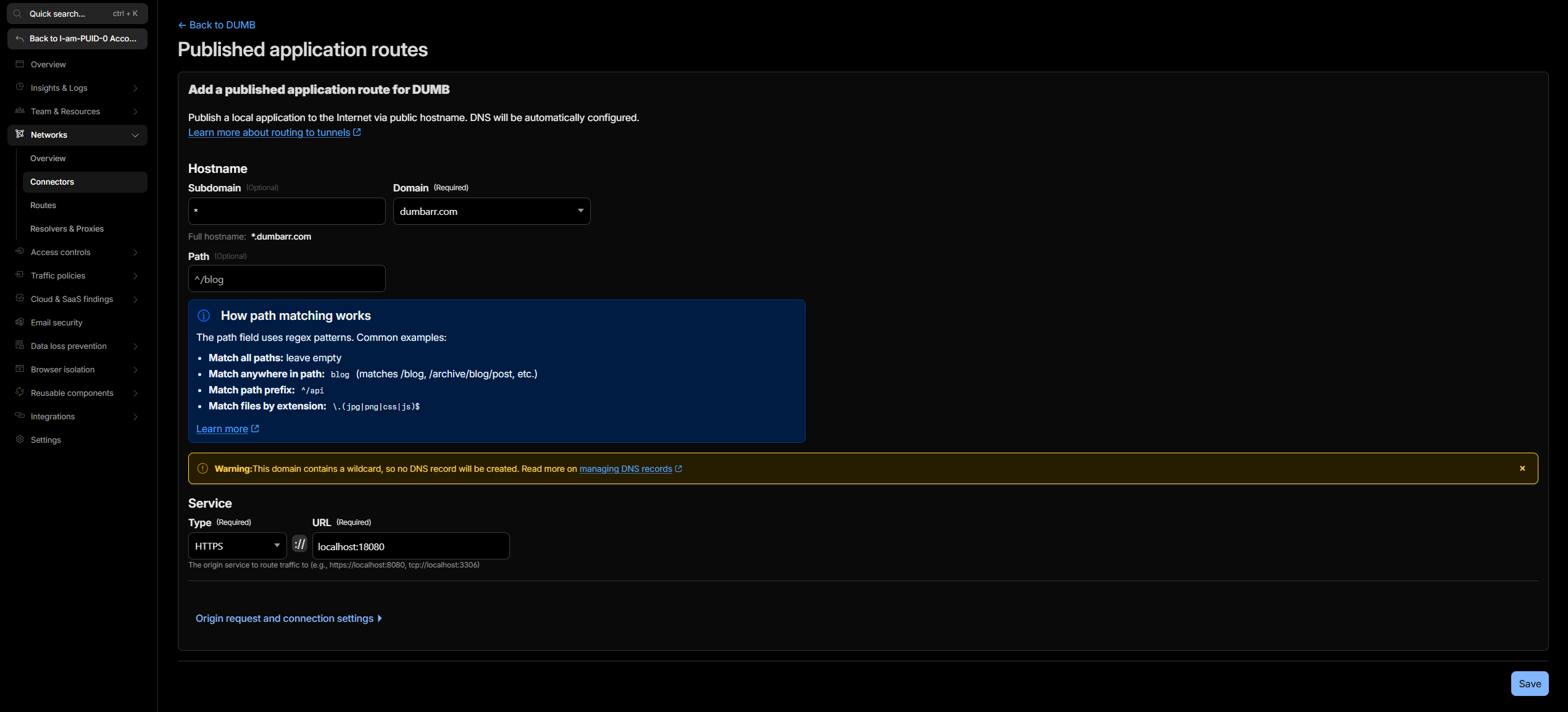
- Go to Published application routes.
- Add or edit a route.
- Select the domain you want to publish under.
- For a wildcard route, set Subdomain to
*. For a single app, enter only that app's subdomain, such asdumbortpa. - Leave Path empty unless you intentionally want path-based routing.
- Set the service type to HTTPS.
-
Set the service URL to:
localhost:18080
Cloudflare may display the final service as https://localhost:18080.
Step 5: Enable No TLS Verify#
Because DUMB Traefik is the HTTPS origin for the tunnel, Cloudflared connects to Traefik over HTTPS inside the container. Traefik's local/default certificate is not expected to validate as localhost, so the route needs Cloudflare's No TLS Verify origin setting.
Open Origin request and connection settings -> TLS, then enable No TLS Verify.
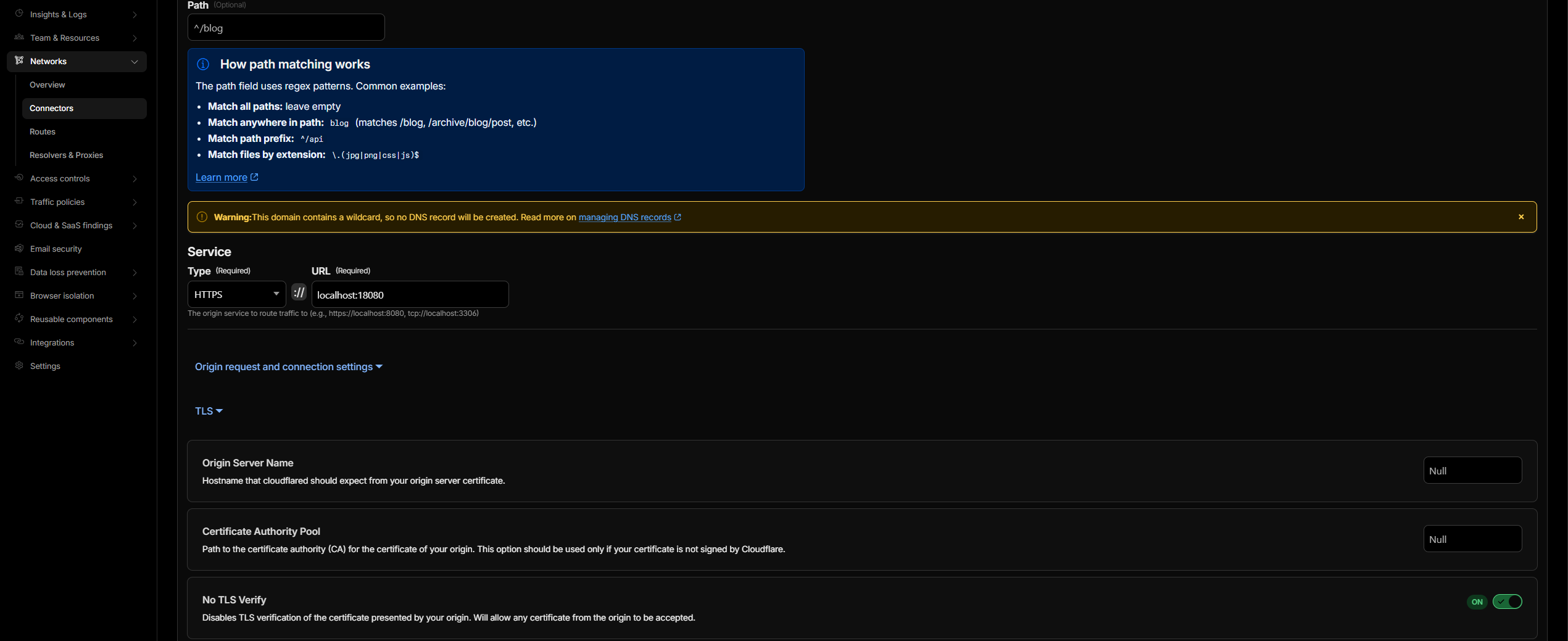
Use this combination for DUMB Traefik:
| Cloudflare route field | Value |
|---|---|
| Service type | HTTPS |
| Service URL | localhost:18080 |
| No TLS Verify | Enabled |
The HTTPS origin is important when TPA-generated routers use TLS. If the Cloudflare route points to http://localhost:18080, Traefik may receive the request but return 404 because the TLS router does not match. If the route points to https://localhost:18080 without No TLS Verify, Cloudflare may return 502 because Cloudflared rejects the local Traefik certificate.
Step 6: Add DNS records#
For a single hostname, Cloudflare may create the DNS record for you when you save the tunnel route.
For a wildcard route, Cloudflare may warn that no DNS record will be created automatically. In that case, add the DNS record manually:
| Type | Name | Target | Proxy status |
|---|---|---|---|
CNAME |
* |
<tunnel-id>.cfargotunnel.com |
Proxied |
If you also want the apex/root domain itself to resolve through the tunnel, add a separate route and DNS record for the apex. A wildcard record covers subdomains; it does not automatically cover the bare apex hostname.
Wildcard routes and TPA
A wildcard tunnel route sends matching subdomains to DUMB Traefik. TPA still needs a matching service route for each public hostname. If Cloudflare reaches Traefik but TPA has no matching router, Traefik will return 404.
Step 7: Publish a service with TPA#
In Traefik Proxy Admin:
- Create or edit a domain matching your Cloudflare zone.
- Add a service.
- Choose a subdomain or custom hostname.
- Set the target IP and port to the app you want Traefik to reach from inside DUMB.
- Configure protection for the service, such as TPA service SSO, Basic Auth, Shared Link, Cloudflare Access, or the upstream app's own login.
- Keep Enable service on.
- Save.
AIOStreams and other headless clients
AIOStreams needs its own stable public HTTPS hostname, but Stremio cannot complete a Cloudflare Access, SSO, or ForwardAuth browser challenge when fetching addon resources. Do not apply an interactive whole-host policy to that route unless every required Stremio-facing path is deliberately exempted. AIOStreams' embedded DUMB route is not a public BASE_URL.
For a quick smoke test, use a deliberately harmless test target or a temporary service that does not expose admin controls or personal data. Avoid using DUMB, TPA, or other admin surfaces as your first public test unless they are already protected by the auth model you intend to keep.
Troubleshooting#
| Symptom | Likely cause | What to check |
|---|---|---|
| Cloudflare shows 502 Bad Gateway | Cloudflared cannot validate or reach the HTTPS origin | Confirm service is https://localhost:18080 and No TLS Verify is enabled. Check Cloudflared logs for tls: failed to verify certificate. |
Browser shows 404 page not found |
Request reached Traefik, but no router matched | Confirm the hostname exists in TPA or DUMB's embedded UI route set. Check Traefik access logs for the requested host. |
| Tunnel is inactive | Connector is not running or token is wrong | Confirm Cloudflared is enabled, token is pasted, and logs show registered tunnel connections. |
| Wildcard subdomains do not resolve | DNS record is missing | Add a proxied wildcard CNAME pointing to <tunnel-id>.cfargotunnel.com. |
| One hostname works but another does not | DNS or TPA route exists for only one host | Check both Cloudflare DNS and the matching TPA service route. |
| Cloudflare route is set to HTTP and Traefik returns 404 | TPA generated TLS routers | Use HTTPS to localhost:18080 plus No TLS Verify. |
Configuration reference#
"cloudflared": {
  "enabled": false,
  "process_name": "Cloudflared",
  "pinned_version": "latest",
  "suppress_logging": false,
  "log_level": "INFO",
  "auto_update": false,
  "auto_update_interval": 24,
  "auto_update_start_time": "04:00",
  "config_dir": "/cloudflared",
  "log_file": "/log/cloudflared.log",
  "tunnel_token": "",
  "command": [
    "/bin/bash",
    "-c",
    "exec /cloudflared/cloudflared tunnel --no-autoupdate run --token \"$TUNNEL_TOKEN\""
  ],
  "env": {
    "HOME": "/cloudflared"
  }
}
Configuration key descriptions#
enabled: Whether to install and start cloudflared.pinned_version: Cloudflared release version, orlatest.tunnel_token: Cloudflare Tunnel token. Required before start.config_dir: Stores the downloadedcloudflaredbinary and version marker.log_file: DUMB-managed log path for cloudflared output.